
Turning Xbox and PlayStation style controllers into beat, sample and effect performance surfaces.
Gamepad music instrument

ABYX
Your controller is now a musical instrument.
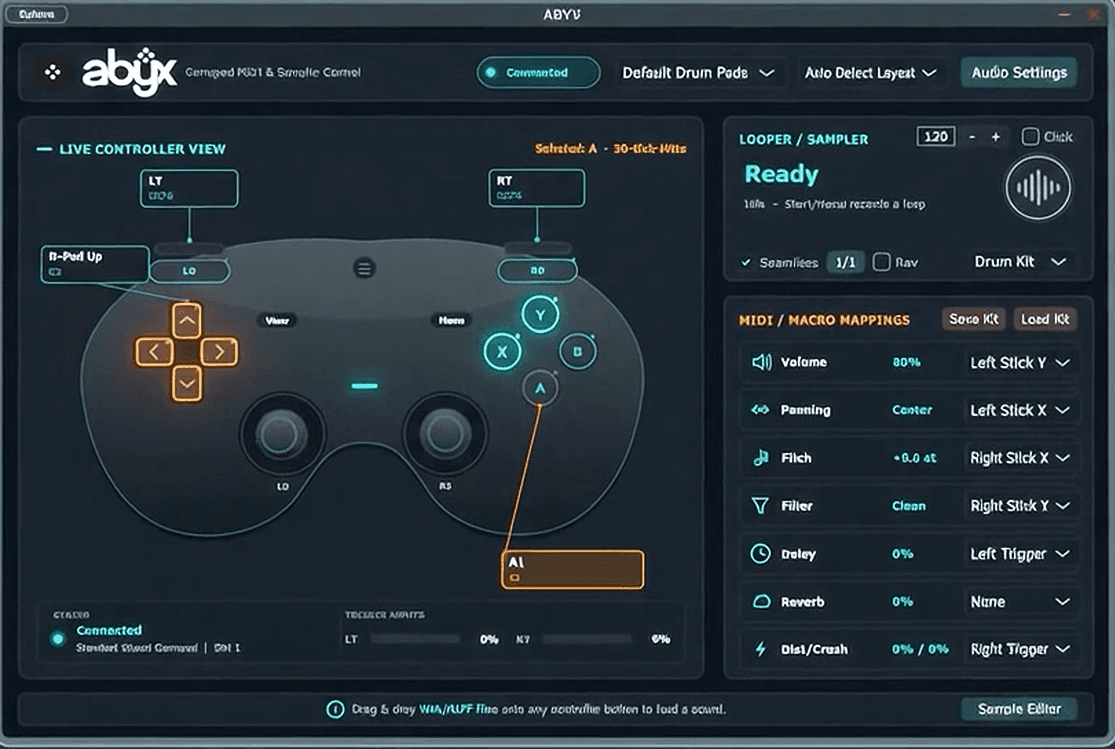
ABYX turns Xbox and PlayStation controllers into performance hardware, mapping buttons and analog sticks to sounds, samples, effects and DAW gestures.
30-day trial for controller-based performance.
- Version
- 1.0.0 beta
- Status
- 30-day trial
- Price
- $10 license
At a glance
A controller-first music instrument for physical input.
ABYX explores the gamepad as musical hardware, mapping familiar buttons and sticks to sounds, parameters and performance gestures.
Map controls, perform with the controller, then capture the musical movement in your setup.
Beta available with Windows standalone and VST3 package.
Interface demonstration
The workflow in motion.
Assign sounds, instruments and effects to a gamepad. Perform beats, manipulate parameters and discover a different way to interact with your DAW.
- 1Map
Assign sounds and functions to controller input.
- 2Perform
Play beats and manipulate effects physically.
- 3Record
Capture controller performances inside the workflow.
Core features
What is inside.
- 01
Xbox and PlayStation controller input
- 02
Button-to-sample and button-to-instrument assignment
- 03
Analog sticks mapped to effects and parameters
- 04
Live visual feedback from physical controller movement
- 05
Performance capture for DAW-centered workflows
Specs
Requirements and setup.
Compatibility
- VST3 compatible hosts
- Windows standalone application
- Xbox and PlayStation style controllers
Installation
- Download the free 30-day trial package from Lemon Squeezy.
- Connect a supported controller before launching ABYX.
- Run ABYX.exe for the Windows standalone app or copy ABYX.vst3 to your DAW's VST3 plugin folder.
- After the trial, enter your license key to keep using ABYX standalone and VST3.
Known beta limitations
- Controller detection can vary by driver and connection type.
- The standalone app is Windows-only for now.
- The license flow is being introduced during the public beta.
30-day trial
$10 license key.
Try ABYX free for 30 days. A license key keeps the standalone app and VST3 plugin unlocked after the trial.
Questions
Before you ask.
Which controllers work?
Xbox and PlayStation style controllers are the beta target. A wired connection is recommended.
My controller is not detected.
Connect it before you start ABYX, and try a cable if you are on Bluetooth. Detection can vary with the driver and the kind of connection.
How does the free trial work?
ABYX is free to use for 30 days. After that, enter a license key to keep using it.
What does the $10 license cover?
One purchase unlocks both the VST3 plugin and the Windows standalone app.
Which music software does it work in?
Hosts that load VST3 plugins, on Windows. The standalone app is Windows-only for now.
Is it finished?
It is a public beta, and controller notes will be published with each release.
Changelog
1.0.0 beta
- Beta package prepared with VST3 plugin and Windows standalone app.
- Controller layout view with live input feedback.
- Button, trigger and analog-stick mapping for musical controls.
Controller support
Designed for familiar pads.
- Xbox and PlayStation style layouts are the initial beta target.
- Wired connections are recommended for the first public beta.
- Driver behavior can vary, so controller notes will live with each release.